
Find pages with visibility but few clicks
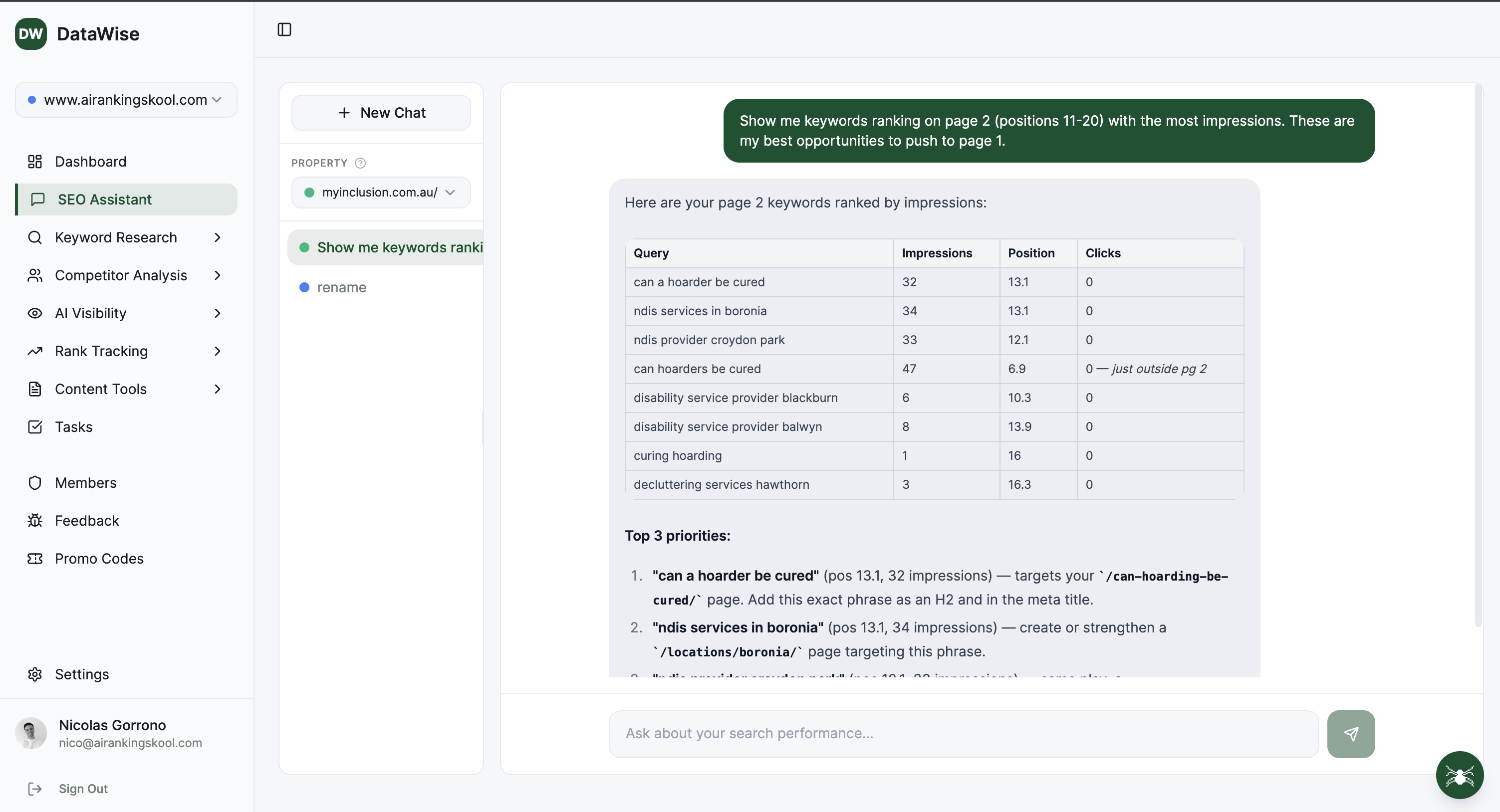
Which pages received impressions but few clicks in the last complete month? Show their main queries so I can review whether the title and page match the search intent.
Connect Google Search Console and ask questions about your clicks, impressions, and pages. Turn the findings into an SEO action plan you can review with your client.
3 focused sub-tools, one unified workflow.
Explore clicks, impressions, CTR, and average position through a conversation about the data available for your connected property.
Ask the assistant to identify pages and queries worth reviewing, then prioritize them against your services, audience, and business goals.
Discuss page titles, missing information, and content updates using search performance and the context you provide.
Choose the relevant Google Search Console property and check the available reporting dates. Tell the assistant about recent launches, page changes, or campaigns.
For example: Compare the last complete 28 days with the previous 28 days. Which pages lost clicks, and how did their impressions and average position change?
Ask for the supporting URLs, metrics, and possible explanations. Verify the figures, inspect the affected pages, and choose an update you can measure afterward.
Use these example prompts with your connected property. The available data and your business context determine what the assistant can help you investigate.
Which pages received impressions but few clicks in the last complete month? Show their main queries so I can review whether the title and page match the search intent.
Which pages account for the largest click decline between these two periods? Compare impressions, CTR, and average position, and separate observations from possible causes.
These are the services and customers this page serves. Based on its available query data, what information should I review or clarify before rewriting it?
Summarize the main changes for this property. Include the date range, the evidence behind each finding, and the questions we need to resolve with the client.
I can update one page this week. Compare these candidate pages using their search performance and relevance to our core service, and explain your recommendation.
We updated this page on the date below. Compare complete periods before and after the change, and explain what the data can and cannot tell us about its effect.
From solo creators to agency operators, every member gets the same unlimited access.
Before a client call, ask for a summary of the pages behind a traffic change. Verify the findings in Search Console and use the conversation to prepare the next set of questions.
Give an account manager a repeatable starting question for each client review. Ask for the reporting period, supporting URLs, and a proposed next action so the team can assess the recommendation.
Choose a page with relevant impressions and few clicks. Ask about its query mix, inspect the search results, and draft an update that better answers the visitor's question.
Explain what your business sells and which customers matter most. Use the assistant to discuss a manageable next step, then check the page and source data before making the change.
Practical guides to help you decide what to do with the data.
ChatGPT cannot see live search data on its own. Here is how to connect DataWise to ChatGPT in about two minutes so it answers SEO questions with real volume, difficulty and CPC.
Read the guide →Learn how to do effective keyword research without enterprise tools. A step-by-step approach for small businesses and solo consultants.
Read the guide →Review Google Search Console performance, follow priority keywords, and check local pack v...
Discover high-value keywords with difficulty scores, search volume, CPC data, and AI-gener...
Bring your SEO data into Claude, ChatGPT, and compatible AI assistants. Research keywords,...
Everything you wanted to know before you start.
Every DataWise tool is included with your AI Ranking membership (from $27/mo). 7-day risk-free trial, no feature gates.